 AI Skill
Turn any document into a narrated video
PPT, Word, Excel, PDF → explainer video
The File to Video skill turns a PPT, Word, Excel or PDF into a narrated explainer video. It parses each slide, page or sheet into a beat, drafts the voiceover from your content, then renders with Remotion. Best for slide walkthroughs, report readouts, training videos and onboarding decks.
How it works
- 1
Upload your file
Drop in a PPT, Word doc, Excel sheet or PDF — the skill reads it end to end.
- 2
Parse into beats
Each slide, page or sheet becomes a scene, structured into a clear narrative flow.
- 3
Draft the voiceover
The AI writes narration from your content, which you can edit before rendering.
- 4
Render the video
Remotion assembles slides, narration and captions into a finished explainer video.
Example prompts
Tap any prompt to open it in the workspace and start creating.
PPT to Narrated Explainer
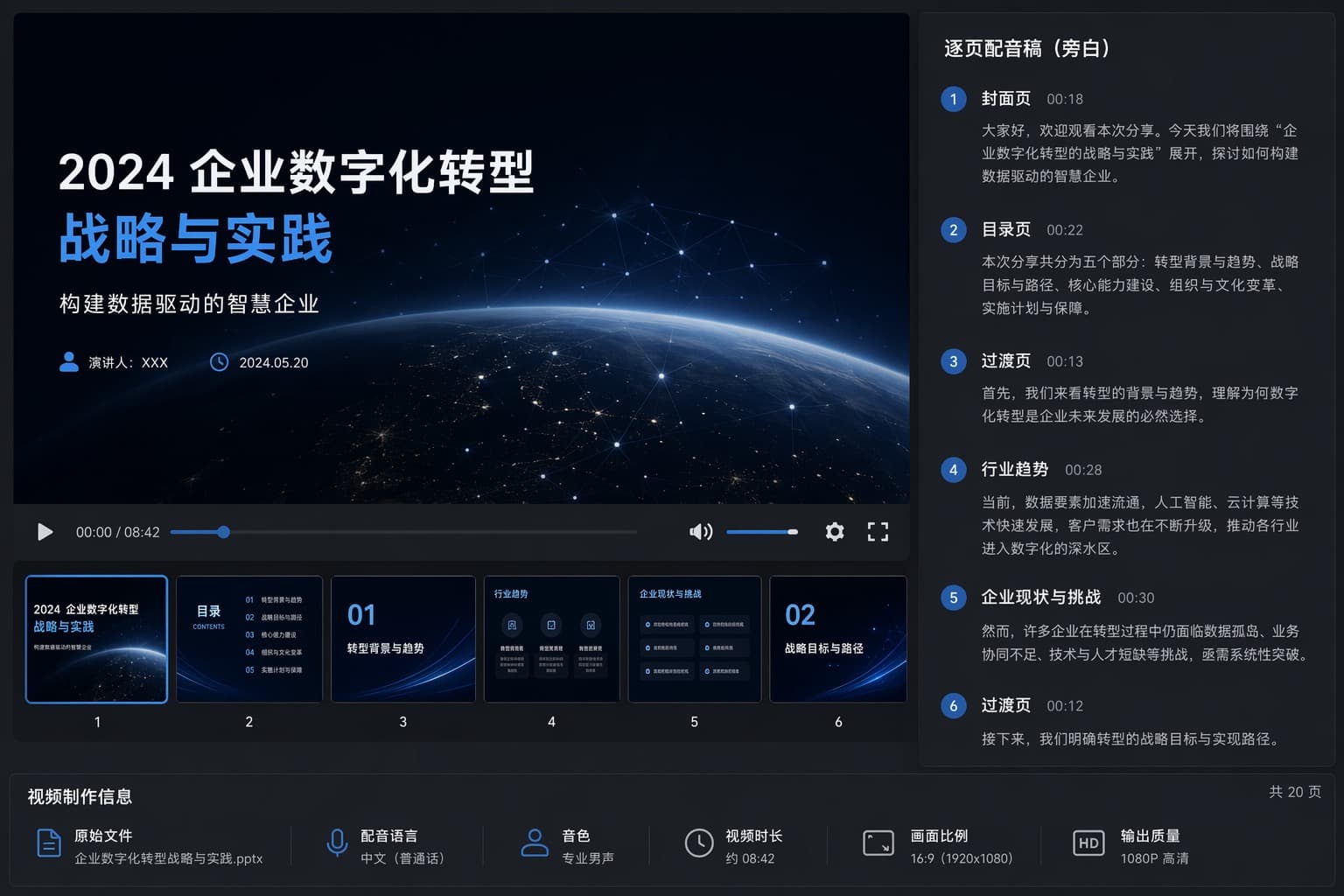
Titled "2024 Enterprise Digital Transformation Strategy and Practice: Building a Data-Driven Intelligent Enterprise". The right-hand panel provides a page-by-page voiceover script that guides viewers through five main sections: transformation background and trends, strategic goals, core capability building, organizational culture change, and the implementation plan. The script first welcomes viewers and outlines the agenda, then explores how rapid technological advances such as artificial intelligence and cloud computing are driving the digitalization process. It also highlights the challenges enterprises currently face (such as data silos and talent shortages), before naturally transitioning into a discussion of specific strategic paths. The bottom area provides metadata about the video production, showing a runtime of about 8 minutes 42 seconds, a professional male Chinese voiceover, a 16:9 aspect ratio, and 1080P HD output resolution.
Annual Report to Video
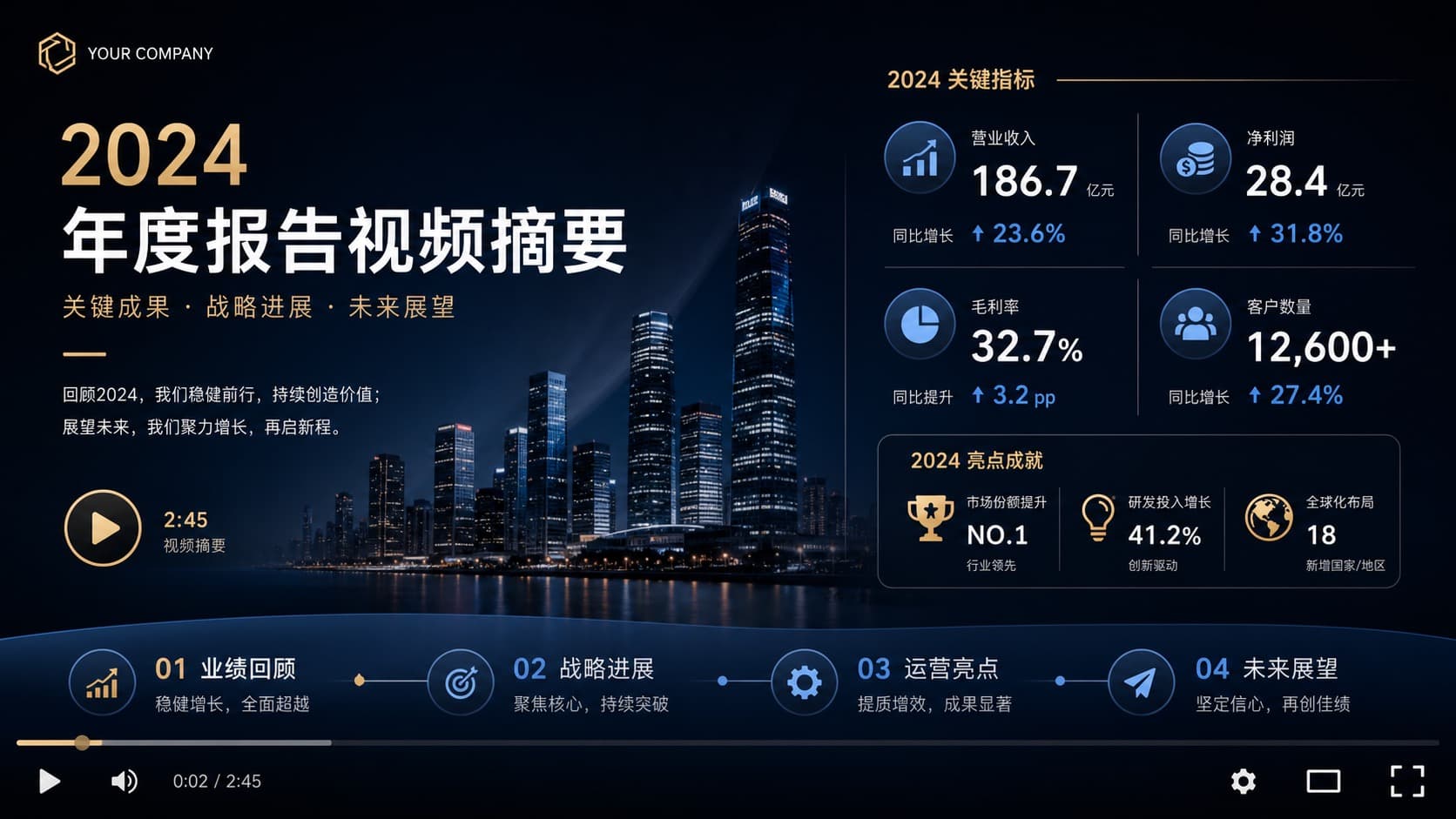
Titled "2024 Annual Report Video Summary". The slides outline the company's core achievements, strategic progress, and future outlook, emphasizing steady growth and value creation in 2024. The slides highlight the following 2024 core metrics: Operating revenue: 18.67 billion yuan (up 23.6% YoY). Net profit: 2.84 billion yuan (up 31.8% YoY). Gross margin: 32.7% (up 3.2 percentage points YoY). Number of customers: 12,600+ (up 27.4% YoY). In addition, the slides list the 2024 highlights, including: holding the No.1 market share, a substantial 41.2% increase in R&D investment, and expanding the global footprint into 18 new countries/regions. The timeline at the bottom clearly maps out the overall structure of the video, divided into four chapters: 01 Performance review, 02 Strategic progress, 03 Operational highlights, 04 Future outlook.

Excel Data Story
Titled "2024 Business Data Review: Insight into Trends · Driving Growth", the whole thing is designed as a video timeline for a "business data story". The visual theme has a dark, futuristic style, with a city skyline in the background and a large 3D bar chart with a rising-trend arrow in the foreground. The top title area highlights three core sections: sales analysis, trend insights, and strategic recommendations. The bottom area is divided into a grid layout containing eight video segments (timestamps from 00:00 to 02:45): 1. Cover page: an opening introduction including consumer trends. 2. Core overview: "2024 Core Performance Overview", showing key metrics (12,845; 2,350; 18,642; 3,865). 3. Revenue trend analysis: a line chart showing the funds/capital revenue trend. 4. Product performance: a chart showing each product line's revenue and year-over-year growth. 5. Regional distribution: a pie chart showing the regional revenue share (total 12,845). 6. Profit trend analysis: a bar chart showing the net profit trend. 7. Core insights: icons representing the growth trend, product drivers, and regional hubs respectively. 8. Action recommendations: a list of three numbered strategic action recommendations.
PDF Whitepaper Recap
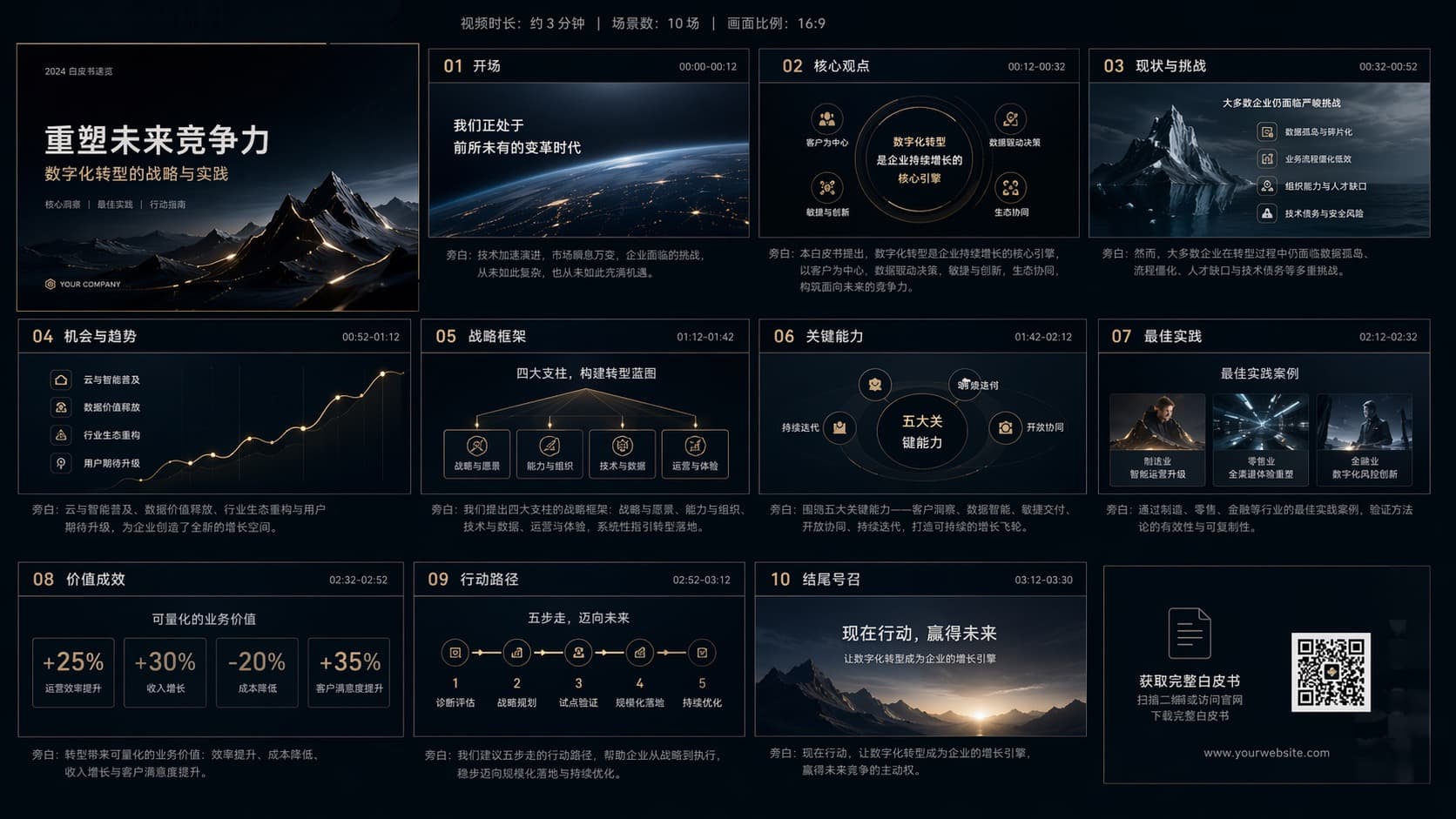
Themed "Reshaping Future Competitiveness: The Strategy and Practice of Digital Transformation". The video is designed in a 16:9 aspect ratio with a runtime of about 3 minutes 30 seconds. Its narrative flows as follows: 01 Opening: introduce the era of "changes unseen in a century" as the backdrop; 02 Core viewpoint: establish that digital transformation is the core engine for boosting competitiveness; 03 Current state and challenges: point out obstacles such as legacy systems and talent shortages; 04 Opportunities and trends: focus on the growth opportunities brought by artificial intelligence and cloud computing; 05 Strategic framework: propose a "Four Pillars" blueprint to support the transformation; 06 Key capabilities: detail five core skills such as agile delivery and data governance; 07 Best practices: showcase success stories across retail, finance, manufacturing, and other fields; 08 Value creation: intuitively present the transformation benefits through quantified metrics such as "25% revenue growth" and "20% cost reduction"; 09 Implementation path: lay out a five-step rollout process from assessment to optimization; 10 Conclusion and call to action: inspire viewers with "Act now, win the future", and end with a QR code for downloading the whitepaper.

Course Slides to Lesson
A course interface for "AI-Empowered Workplace Efficiency: From Tool Application to Real-World Implementation", presented by Jason. The course focuses on how to use AI tools to boost productivity and create more value through optimized search and enhanced professional skills. The screen shows a panorama of mainstream AI tools, including ChatGPT, Midjourney, and Notion AI, covering a variety of task scenarios from content creation to office productivity. In addition, the course demonstrates a workflow for automatically generating meeting minutes and summaries. The course outline on the right side of the interface is divided into eight chapters, covering: the future development of AI, tool introductions, specific workplace application scenarios, content creation, data analysis, and practical implementation strategies.
Pitch Deck Walkthrough
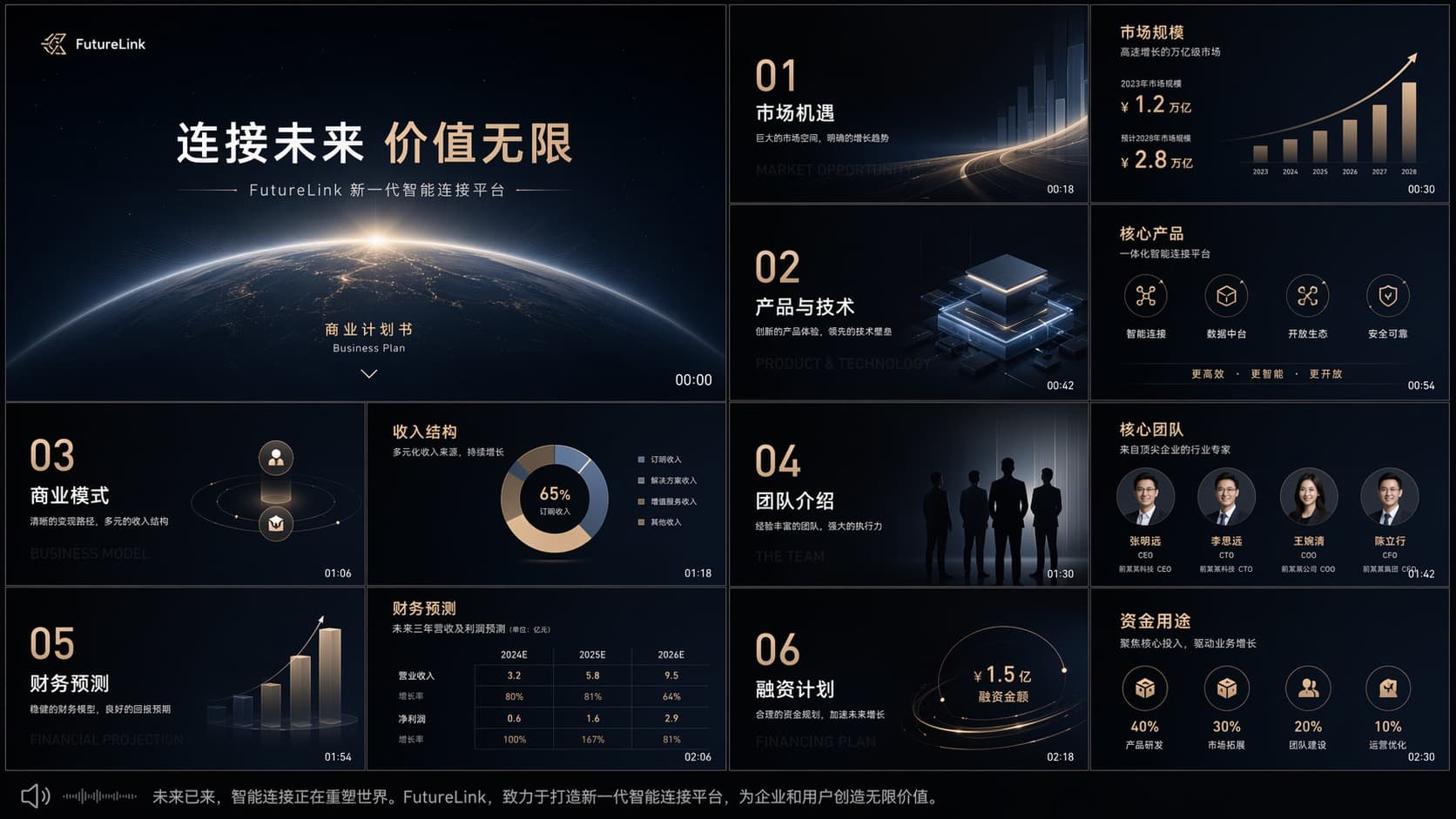
An overview of the business plan for "FutureLink". The plan aims to build a next-generation intelligent connectivity platform, themed "Connect the future, create infinite value". The entire presentation is divided into six core sections: Market opportunity: emphasizes that the market is expanding rapidly, expected to reach 2.8 trillion yuan by 2028. Product and technology: showcases a comprehensive integrated platform centered on intelligent connectivity, data analytics, and security protection. Business model: presents a diversified revenue structure. Team introduction: showcases a core team made up of industry experts. Financial forecast: projects steady growth in revenue and profit from 2024 to 2026. Financing plan: plans to raise 150 million yuan, with funds primarily allocated to product R&D (40%) and market expansion (30%). The project's overall goal is to reshape the world through intelligent connectivity and create infinite value for users.
Frequently asked questions
Which file types are supported?
PowerPoint (PPT/PPTX), Word, Excel and PDF. Each is parsed slide-by-slide or page-by-page into video scenes.
How do I convert a PPT to a video?
Upload your presentation, let the skill turn each slide into a narrated scene, review the voiceover, and export.
Can I edit the narration?
Yes. The drafted voiceover is fully editable before the final render.
What's it best for?
Slide walkthroughs, report readouts, training videos and onboarding decks.