 AI Skill
Turn math into an animated explainer video
Equations, graphs and proofs, animated and narrated
The Math Explainer Video skill turns a math or physics concept, formula, derivation or theorem into an animated, narrated explainer video with a blackboard look. Equations are typeset with KaTeX for LaTeX-quality, graphs and geometry are animated SVG, and derivations are staged as step-by-step reveals — assembled by Remotion with narration, captions and music.
How it works
- 1
Describe the concept
Give a formula, derivation, theorem or topic you want explained.
- 2
Typeset the math
Equations are rendered with KaTeX for clean, LaTeX-quality typography.
- 3
Animate the reveal
Graphs and geometry become animated SVG, and derivations unfold step by step.
- 4
Narrate and assemble
Remotion combines visuals, narration, captions and music into the final cut.
Example prompts
Tap any prompt to open it in the workspace and start creating.
Theorem & Formula Explainer
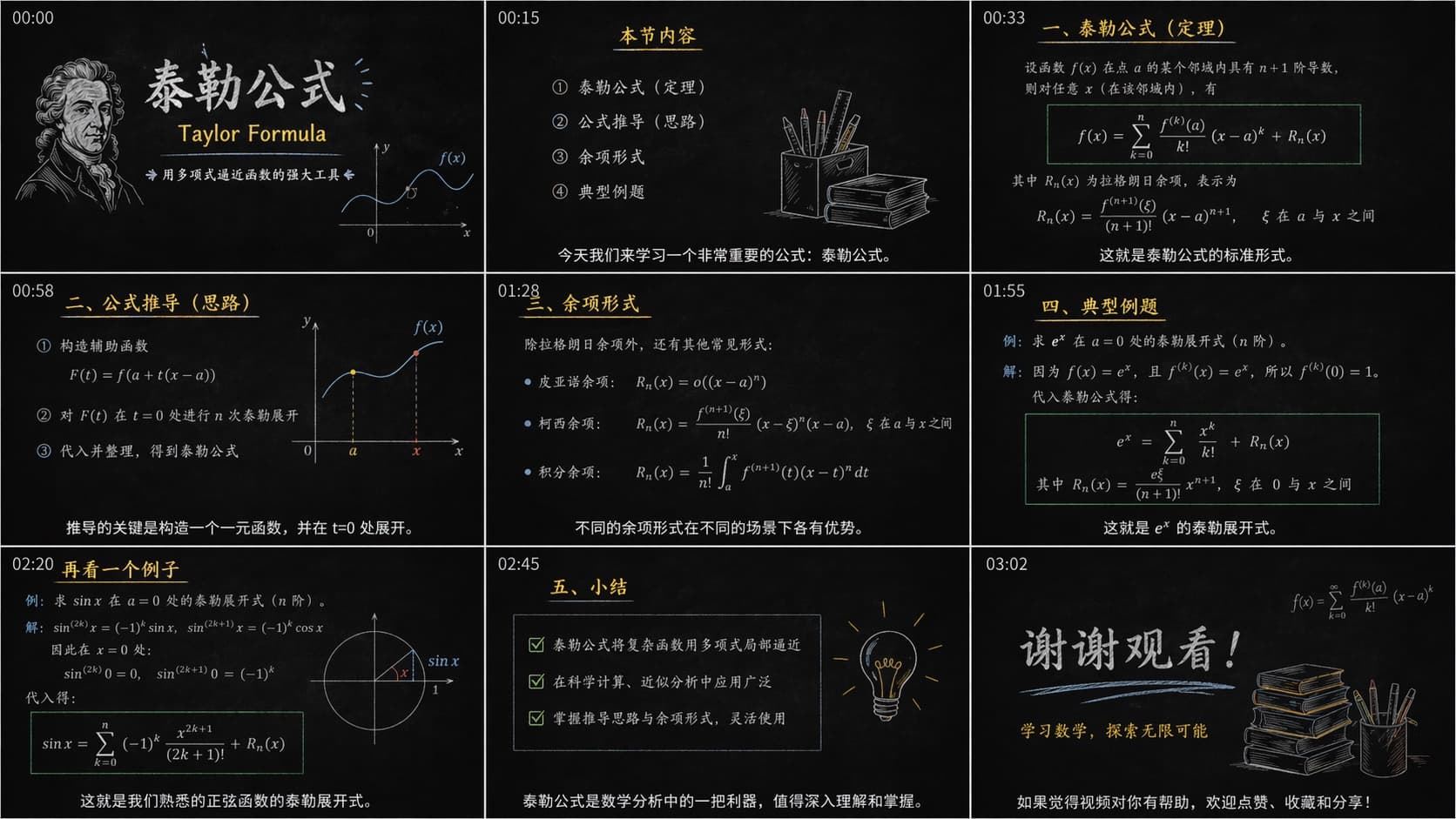
This image outlines the storyboard script for a video lesson on Taylor's formula. The video begins with a course introduction and table of contents, covering the theorem, the derivation approach, the remainder term, and typical examples. The slides present the standard equation of Taylor's formula, including the polynomial sum and the remainder term R_n(x), with special emphasis on the Lagrange form of the remainder. The derivation strategy is explained by constructing an auxiliary function F(t) = f(a + t(x−a)) and expanding it at t=0. The video also lists the different forms of the remainder (Lagrange remainder, Peano remainder, integral remainder). The lesson also provides practical application examples, such as the Maclaurin expansions of e^x and sin(x). Finally, the summary highlights the formula's powerful role in approximating complex functions with polynomials, ending with a "Thanks for watching" slide.
Calculus Derivation
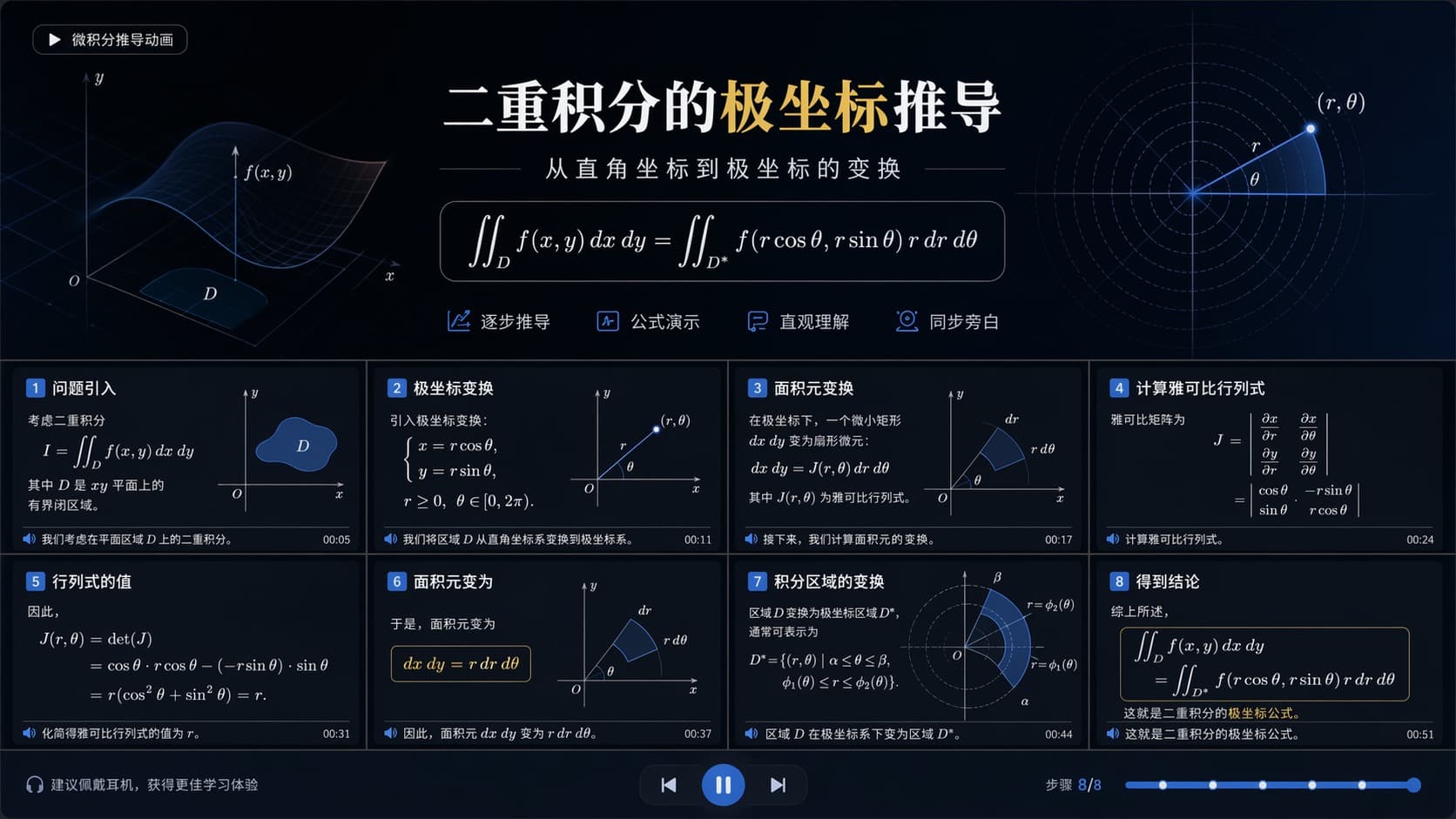
This image is a teaching slide titled "Derivation of the Double Integral in Polar Coordinates: Transforming from Cartesian to Polar Coordinates". Its core is the following formula: ∬_D f(x,y) dx dy = ∬_{D*} f(r cosθ, r sinθ) r dr dθ The bottom of the slide breaks the derivation into 8 steps: 1. Problem setup: start from the standard double integral over the region D. 2. Polar transformation: introduce the substitutions x = r cosθ and y = r sinθ. 3. Area element transformation: explain how the tiny rectangle dx dy is transformed via the Jacobian determinant J(r,θ). 4. Compute the Jacobian: set up the determinant matrix of partial derivatives. 5. Value of the determinant: compute it to be r(cos²θ + sin²θ) = r. 6. Area element: conclude that dx dy = r dr dθ. 7. Transforming the integration region: describe how the original region D is converted into the region D* in polar coordinates. 8. Conclusion: give the final formula for the double integral in polar coordinates.

Geometry Proof Animation
A geometry proof animation of "the base angles of an isosceles triangle are equal". It presents a step-by-step demonstration (currently showing step 1 of 7), proving that in the isosceles triangle ABC, when AB = AC, the base angles ∠B and ∠C are equal. The timeline at the bottom outlines the 7-step proof: 1. Given: △ABC is an isosceles triangle with AB = AC. 2. Draw the median: construct the median AD to the base BC. 3. Construct a right angle: establish that AD is perpendicular to BC (since the median to the base is also the altitude). 4. Prove congruence: prove that the right triangles △ABD and △ACD are congruent (using the HL theorem: AB = AC, BD = DC, AD = AD). 5. Corresponding angles equal: since the triangles are congruent, ∠B = ∠C. 6. Conclusion: the base angles of an isosceles triangle are equal. 7. Q.E.D.
Physics Concept Visual
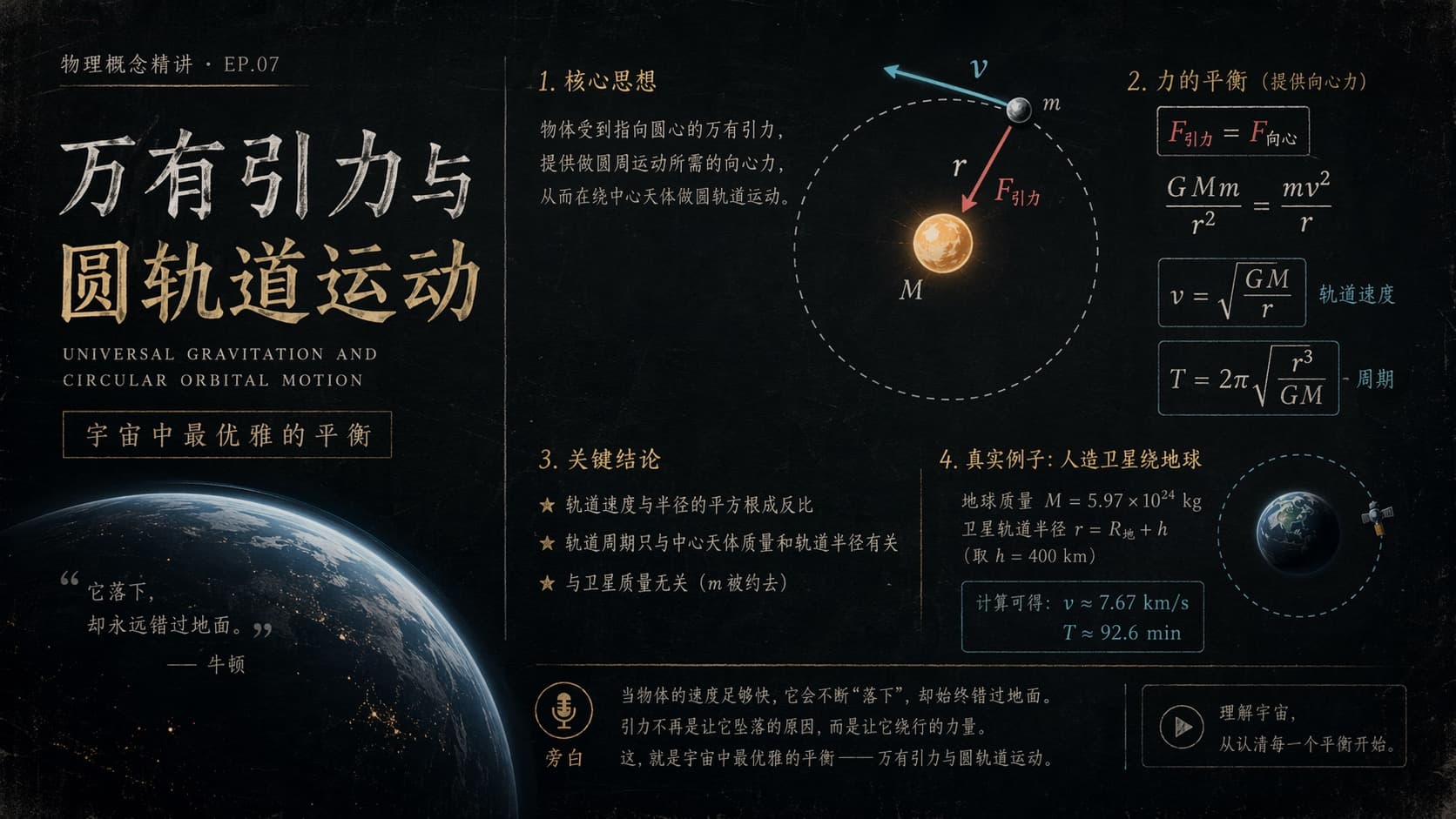
Title: Gravitation and Circular Orbital Motion (Physics Concept Explainer · Episode 07) Subtitle: The most elegant balance in the universe 1. Core idea: An object experiences a gravitational force directed toward the center, and this force provides exactly the centripetal force needed for circular motion, allowing it to orbit the central body. 2. Force balance (gravity provides the centripetal force): The slide sets gravity equal to the centripetal force (F_gravity = F_centripetal). Formula: GMm/r² = mv²/r Orbital speed: v = √(GM/r) Orbital period: T = 2π√(r³/GM) 3. Key conclusions: Orbital speed is inversely proportional to the square root of the orbital radius. The orbital period depends only on the mass of the central body and the orbital radius. It is independent of the satellite's own mass (the m cancels out in the formula). 4. Real-world case: an artificial satellite orbiting Earth: Earth's mass (M) = 5.97×10²⁴ kg. Orbital radius r = R_Earth + h (here the orbital altitude h = 400 km). The computed speed (v) = 7.67 km/s. The orbital period (T) ≈ 92.6 minutes. Intro and footer text: Quote: "The apple falls, yet misses the ground." — Newton Explanation: When an object moves fast enough, it does not "fall to the ground" but keeps orbiting. Gravity is not what makes it fall to the ground, but the force that keeps it in orbit. This is the most elegant balance in the universe—gravitation and circular orbital motion. Bottom-right: Understanding the universe begins with making sense of a single balance.
Function Graph Story
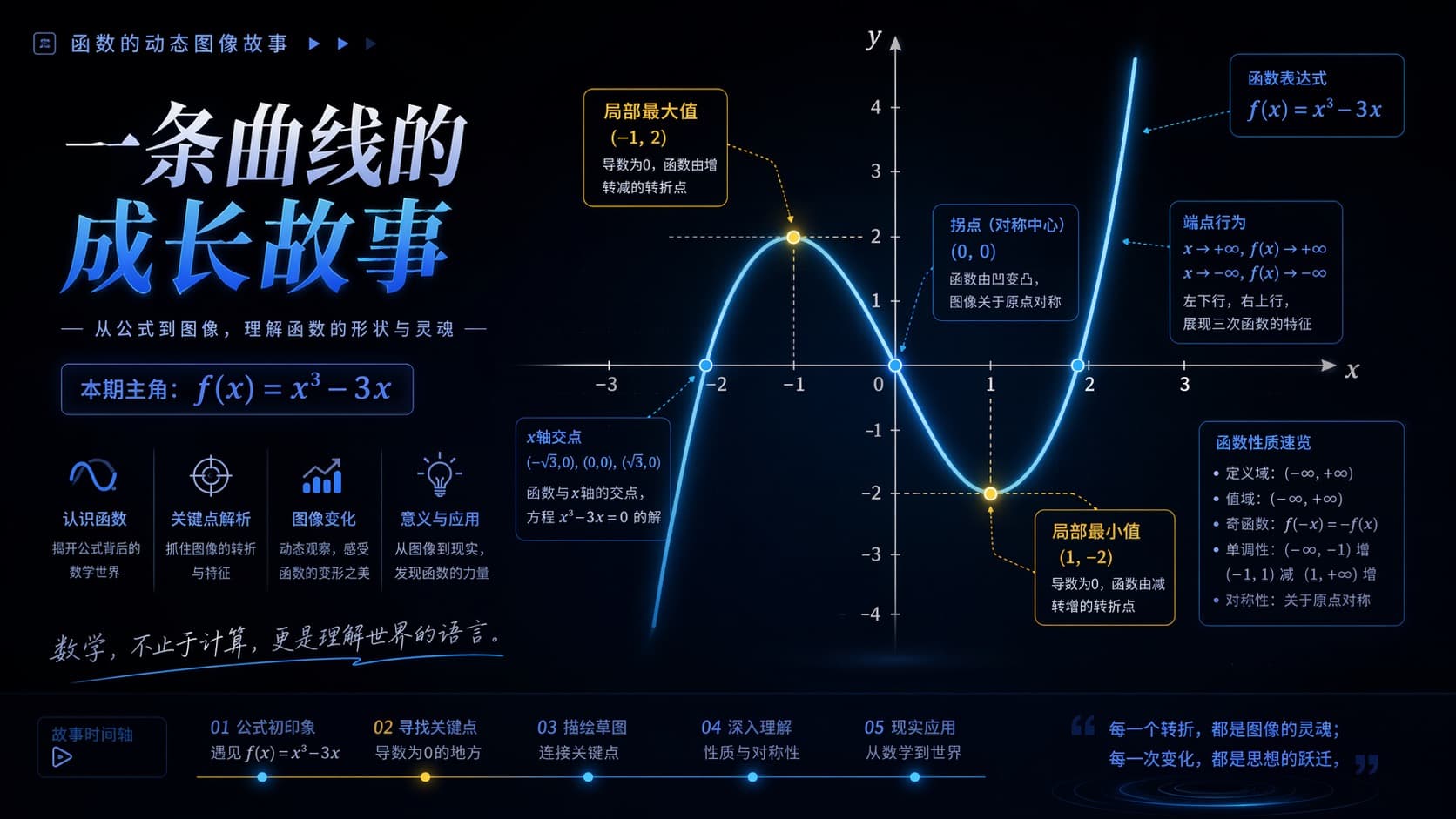
Titled "The Growth Story of a Curve", this slide explores the cubic function f(x) = x³ − 3x in depth. It visually presents the function's graph on a coordinate system and highlights several key features: a local maximum at (−1, 2), a local minimum at (1, −2), and an inflection point at (0, 0) that serves as the center of symmetry. Through several text boxes, the slide breaks down the function's characteristics in detail: Function expression: f(x) = x³ − 3x. End behavior (trend): as x → +∞, f(x) → +∞; as x → −∞, f(x) → −∞ (vividly described as "down on the left, up on the right"). X-axis intercepts (zeros): (−√3, 0), (0, 0), and (√3, 0), which are exactly the solutions of the equation x³ − 3x = 0. Function properties: both its domain and range are (−∞, +∞). The function is odd (satisfying f(−x) = −f(x)) and symmetric about the origin. It is monotonically increasing on the intervals (−∞, −1) and (1, +∞), and monotonically decreasing on (−1, 1). The bottom of the slide lays out a five-step learning timeline—from the introduction of the formula all the way to real-world applications—accompanied by an inspiring quote: "Mathematics is not just calculation; it is the language for understanding the world."
Step-by-step Math Lesson
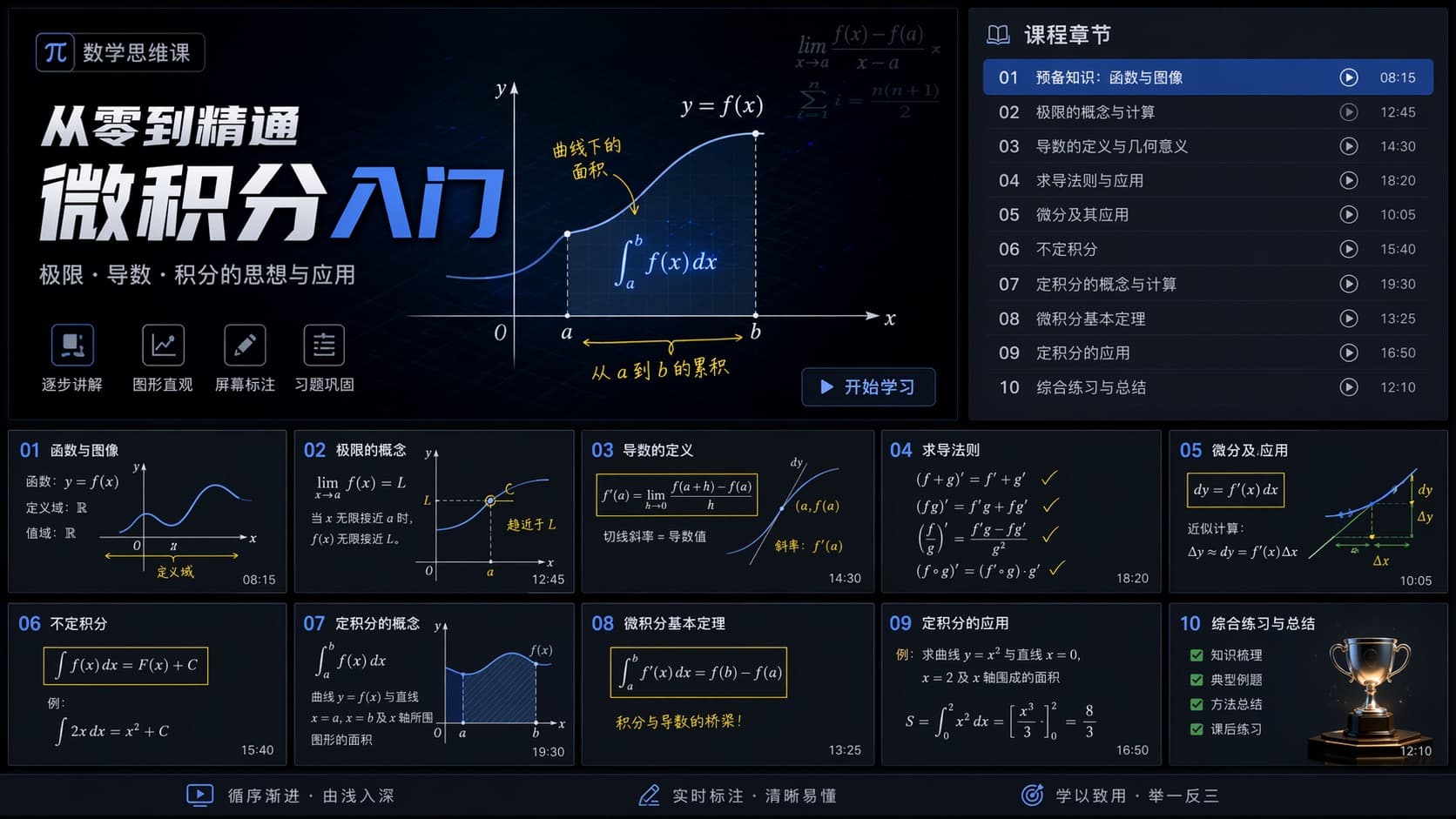
Titled "From Zero to Mastery: Introduction to Calculus", the course focuses on the core ideas and practical applications of limits, derivatives, and integrals. At the center of the frame is the graph of a function y = f(x), intuitively illustrating the concept of the definite integral ∫_a^b f(x) dx—the area under the curve from a to b. On the right side of the graph, a "Course Chapters" list lays out a syllabus of 10 lessons: 1. Prerequisites: functions and graphs. 2. Limits: concepts and computation. 3. Derivatives: definition and geometric meaning. 4. Differentiation rules: and their applications. 5. Differentials: and their applications. 6. Indefinite integrals. 7. Definite integrals: concepts and computation. 8. The Fundamental Theorem of Calculus. 9. Applications of definite integrals. 10. Comprehensive practice and summary.
Frequently asked questions
What does the result look like?
A clean, blackboard-style animated explainer in the spirit of 3Blue1Brown, with narrated step-by-step math.
How are equations rendered?
With KaTeX, giving LaTeX-quality typesetting for formulas and derivations.
Can it animate graphs and geometry?
Yes. Functions and geometry are drawn as animated SVG, and proofs reveal step by step.
Who is it for?
Educators, students and creators who want polished, narrated math and physics explainers.